
Risks
Risk or issue? How to separate and handle each one in a project

In the rush of a project, risks and issues end up on the same list. The result is a spreadsheet where "possible supplier delay" shares space with "server down since yesterday", and neither gets the right treatment. Separating the two is simple and changes how you act.
The difference in one sentence
A risk is an uncertain event that may or may not happen. An issue is a fact: it has already happened and is affecting the project. With a risk, the team prepares. With an issue, the team resolves.
| Risk | Issue | |
|---|---|---|
| Status | May happen | Has already happened |
| How it is assessed | Probability and impact | Severity and urgency |
| What you do | A response planned before the event | Corrective action now |
| When it comes off the list | When it is no longer possible or becomes an issue | When it is resolved |
When a risk becomes an issue
If the anticipated event happens, the risk is no longer uncertain. At that point it is closed as a risk and logged as an issue, ideally with a reference to the original risk. This shows whether the response plan worked and helps write the lessons learned.
How to handle an issue
- Log: what happened, when and what is affected.
- Prioritize: cross severity and urgency to decide the order of attack.
- Assign: an owner for the resolution and deadlines for the actions.
- Communicate: notify the team and stakeholders at every status change.
- Close: record the resolution and the evidence.
How it works in OnePlanner
Risks and issues are kept separate inside the project. Risks have a register with cause, event and consequence, threat and opportunity matrices and responses. Issues are prioritized by severity × urgency, follow a configurable lifecycle and have owners, comments and evidence. The team and stakeholders are notified at every status change, and both feed into the project health calculation.
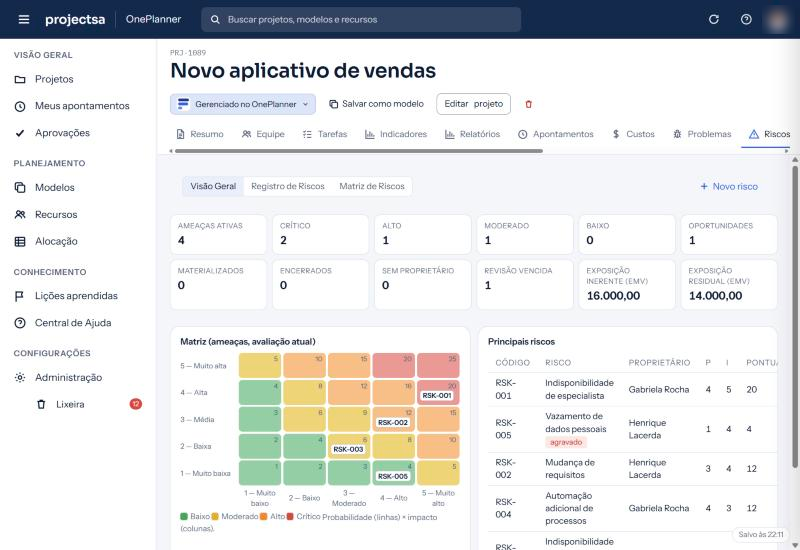
See how it works in OnePlanner: risks, issues and changes.
Book a demo and see how risks and issues are handled in OnePlanner.
Frequently asked questions
Is a "problema" the same as an issue?
Yes. "Issue" is the English term used in many guides and tools for what Portuguese speakers call "problema".
Does every issue have to have been a risk first?
No. Many issues arise without having been anticipated. When that happens often, it is a sign that risk identification needs to improve.
Do issues affect project health in OnePlanner?
Yes. Issues are one of the dimensions of the calculation, alongside schedule, cost, scope, risks and changes.


