
Your fields
13 field types for projects, tasks and resources, with validation, default value and permissions. They appear in grids, filters, forms and reports.
Customization and administration
Colors and logo in the header, custom fields in forms and reports, rules for costs, indicators, risks and permissions in administration. All configured by your team, with no coding.
Benefits
13 field types for projects, tasks and resources, with validation, default value and permissions. They appear in grids, filters, forms and reports.
Your company's colors, display name and logo, including in the app header.
Calendars, costs, indicators, risks, changes, issues, time entries and documents configured in administration.
Roles, a permission matrix by module, action and scope, project roles, auditing and access simulation.
Customization
Administrators set the colors, display name and logo, and create the fields your process requires, with validation, default value and permissions. The fields appear in grids, filters, forms and reports.
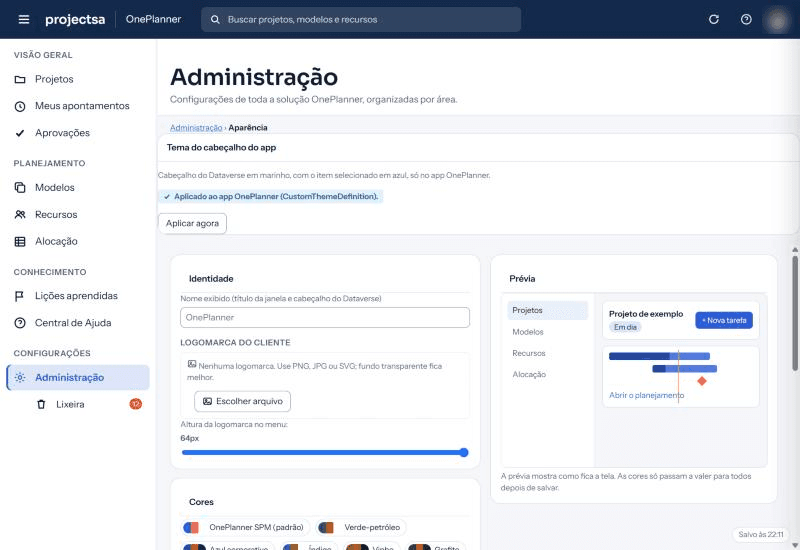
Administration
Calendars, classifications, costs, indicators, risks, changes, issues, reports, time entries, documents, languages, roles and permissions are configured in one place, by the company's own team.
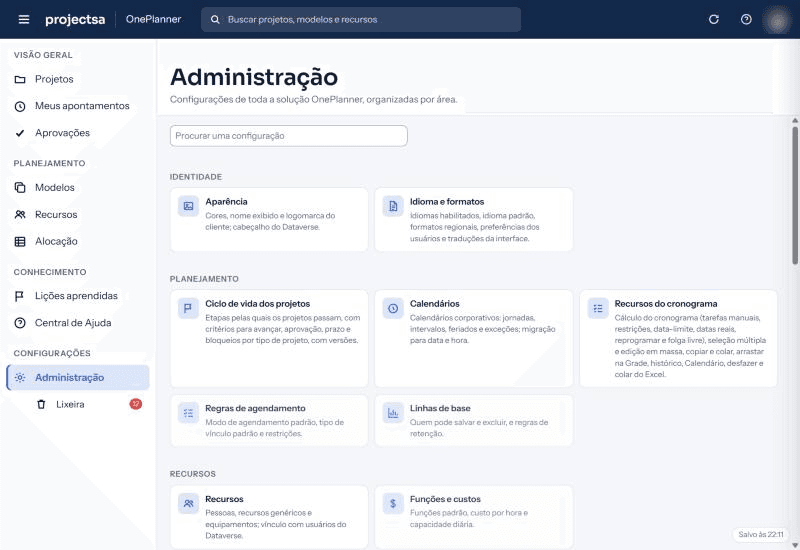
Deployment
Frequently asked questions
No. Fields, appearance and rules are configured in OnePlanner administration.
Sign-in is through Microsoft Entra ID. Roles, a permission matrix by module, action and scope, and project roles define what each person sees and does, with auditing and access simulation.
Yes. Demo mode generates sample portfolios, projects and resources, marked as demo, and removes everything afterwards.
Schedule a demo. We show the platform with sample data similar to your company's and answer your PMO's and IT's questions.