
Skip to content
OnePlanner
Menu

Programs and portfolios

Project program and portfolio management

See all of the company's projects in a single portfolio, know where the investment is paying off and where it needs adjustment, and drill down to the project in a few clicks. The same portfolio brings together projects managed in OnePlanner, Microsoft Project, Planner Premium, Jira, Azure DevOps and other integrated tools.

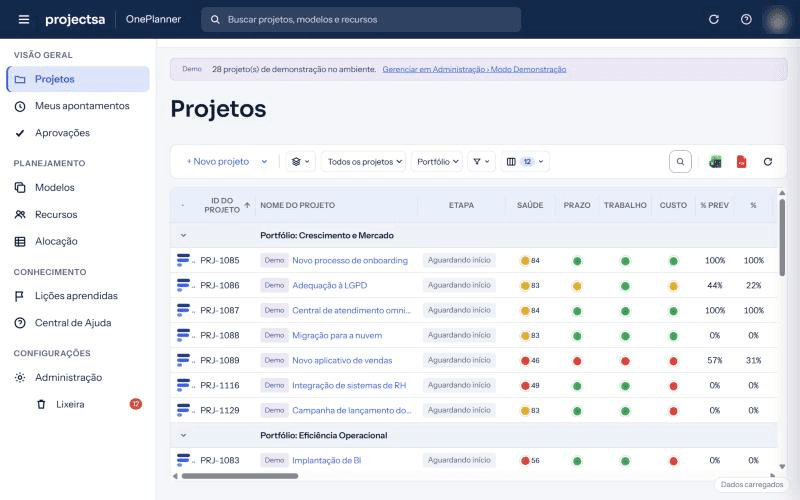
Project Center grouped by portfolio, with health, schedule, work and cost

Benefits

Decide where to invest with the same numbers for everyone.

One portfolio, many tools

Engineering in Microsoft Project, business areas in Planner, technology in Jira or Azure DevOps. Each team keeps the tool it already uses, and every project enters the same portfolio, with the same records and the same indicators.
Comparable health

The 0 to 100 health score follows the same rules for every project, so projects from Project, Planner, Jira or Azure DevOps are compared fairly.

Dependencies in plain sight

Master projects bring a program's projects into a consolidated schedule, and a delay in one shows up in the plan of the others.

Standard from day one

Corporate templates make each type of project start with the same structure, fields and stages.

Navigation

From portfolio to project in three clicks

  1. 01PortfolioBudget, average health and number of projects, to decide where to invest.
  2. 02ProgramProjects that deliver one outcome together, tracked as a set.
  3. 03ProjectSchedule, cost, risks and progress, whether it is managed in OnePlanner, Project, Planner, Jira or Azure DevOps.
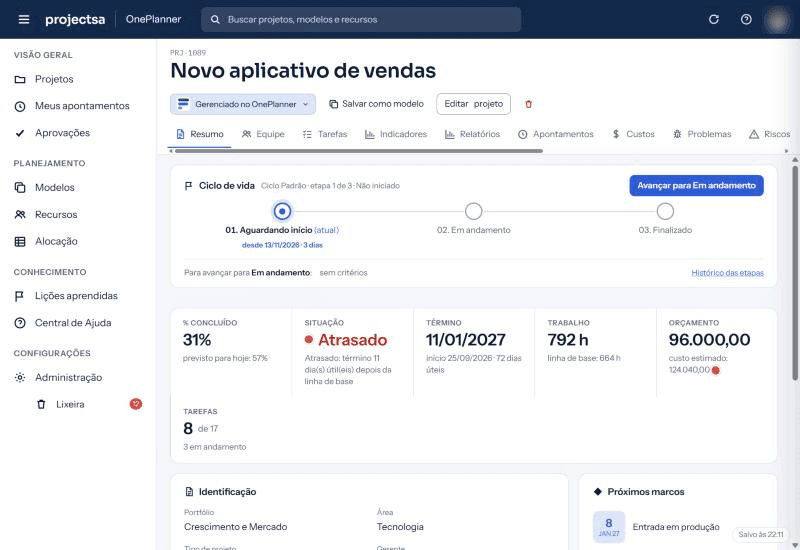
Project summary with status, schedule, work and budget

Project Center

The whole portfolio on one screen

The Project Center shows health, status, schedule, work, cost and planned and actual percentages for every project side by side, whether managed in OnePlanner, Microsoft Project, Planner Premium, Jira or Azure DevOps. In one click, leadership sees only late or at-risk projects, groups by portfolio, program, department or manager, and saves the view used in the portfolio meeting. When a project is opened, the 0 to 100 health score shows which dimension pulled the score down.

  • Filters for late or at-risk projects
  • Saved views for each meeting and audience
  • Export to Excel and PDF
Project health from 0 to 100 with indicators by dimension

Programs

Programs with dependencies between projects

Master projects bring a program's projects together in a consolidated schedule, with the dependencies between them and without copying tasks. When one project's delivery changes, the effect on the others shows up in the same plan, in time for the program manager to act.

  • Master projects
  • Dependencies between projects
  • Consolidated schedule without copying tasks
Consolidated schedule with dependencies between projects

Portfolio indicators

What leadership tracks in each portfolio

  • Budget: planned cost, approved budget and actual cost for every project, with CAPEX and OPEX by cost center
  • Health: the portfolio average and the projects below the healthy range, with the dimension that pulled the score down
  • Schedule: projects and milestones late against the baseline
  • Risks and changes: the most serious risks and the changes awaiting a decision
  • Capacity: who is overloaded, adding up allocation across all projects

Frequently asked questions

Programs and portfolios in OnePlanner.

What is the difference between a project, a program and a portfolio?

A project delivers an outcome with a defined schedule and budget. A program coordinates related projects that create a benefit together. A portfolio brings together projects and programs chosen to deliver the strategy.

Can a portfolio contain projects from different tools?

Yes. That is OnePlanner's starting point. Each project states the tool it is managed in: OnePlanner itself, Microsoft Project, Planner Premium, Jira, Azure DevOps or another integrated tool. All of them enter the same portfolio, with the same records and the same indicators.

Can the data go to Power BI?

Yes. The data stays in your company's Dataverse and can feed the BI dashboards you already have.

Blog

Go deeper on the topic

All articles

Discover OnePlanner

Schedule a demo. We show the platform with sample data similar to your company's and answer your PMO's and IT's questions.