
Schedule
Project baseline: how to measure schedule and cost variance

Without a baseline, there is no delay. There is only a finish date that changes every week, without anyone knowing how far it has moved since the project was approved. The baseline is a snapshot of the approved plan and the reference for everything measured afterwards.
What the baseline stores
When the baseline is saved, the schedule records, for each task and for the project, the start and finish dates, duration, work and cost planned at that moment. From then on, the plan keeps changing, but the baseline does not. The difference between the two is the variance.
When to save the baseline
- After the plan is approved: never before, so a draft is not locked in as a commitment.
- With resources and costs assigned: without them, the baseline only measures schedule.
- Before you start recording progress: so the first variance is already measured against the approved plan.
When to create a new baseline
A new baseline only makes sense when the commitment changes: an approved scope change, a replan authorized by the sponsor. Saving a new baseline after every delay erases the history and hides the problem. That is why it is common to keep more than one: the original and the ones approved after each change, each with the reason recorded.
The variances worth tracking
- Schedule: forecast finish minus baseline finish, for the project and its milestones.
- Work: forecast hours compared with baseline hours.
- Cost: forecast cost compared with baseline cost.
How it works in OnePlanner
The OnePlanner schedule has baselines to compare the approved plan with the current forecast, shown on the Gantt next to the current dates. The Report Center has a baselines report, and schedule variance feeds into the project health calculation. When a change is approved through change control, the record shows why the plan changed.
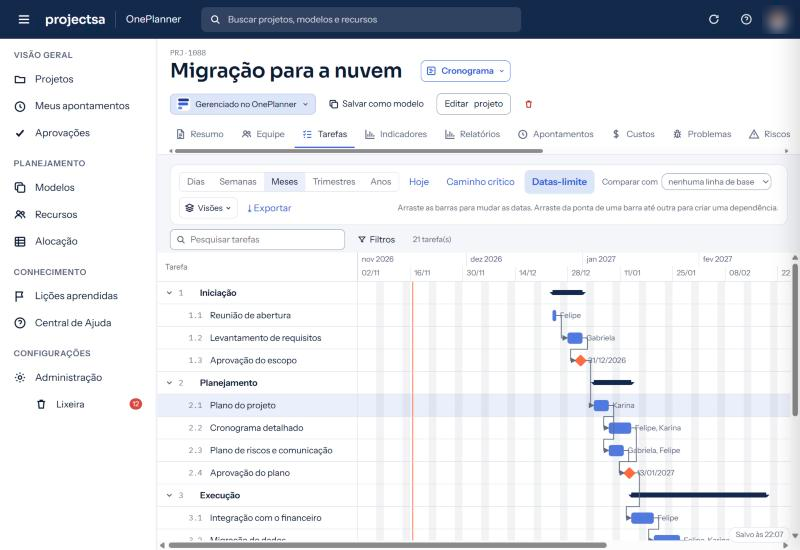
See how it works in OnePlanner: project and schedule management.
Book a demo and see the Gantt with baseline in OnePlanner.
Frequently asked questions
Can I have more than one baseline?
Yes. OnePlanner works with baselines, plural, to keep the original and the ones that come after approved changes.
Does the baseline apply to Microsoft Project projects?
The schedule can be planned in Project Desktop and published to OnePlanner through the connector. How the baseline is handled in that case is defined during deployment.
Does updating the baseline every month fix the delay?
No. It only hides it. The baseline should only change when the commitment changes.


